
SidebarModule
SidebarModule shows a per-player sidebar to all players in the game.
Bindings
A binding is a function that returns a list of text components to display on the sidebar. Games can only have one binding at a time. Add one with the bind method:
sidebarModule.bind { player -> getStatusSection() + listOf( Component.text("Some text on the"), getSpacer(), Component.text("scoreboard!"), )}That binding looks like this:
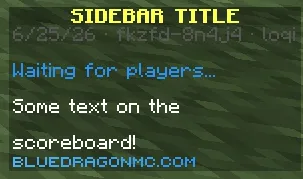
SidebarModule exposes a number of helper methods inside the binding block, including:
getSpacer(): always returns a component that can be used as an empty line.Component.empty()won’t work more than once because every line must be unique.getStatusSection(): returns a list of components showing the pre-game state (server starting, waiting, starting), with spacers before and after. If the game is ingame or ending, the function returns a single spacer.
The bind method returns a reference to the new scoreboard binding. You can use binding.update() to refresh the sidebar at any time. The sidebar is automatically updated when the game state changes.
The footer text is derived from the global.server.domain.stylized translation key.
Usage
Import the module:
import com.bluedragonmc.server.module.gameplay.SidebarModuleUse the module in your game’s initialize function.
// title is shown at the top of the sidebaruse(SidebarModule(title = "Sidebar Title")) { sidebarModule -> // here is a great place to add your binding with sidebarModule.bind!}